> ## Documentation Index
> Fetch the complete documentation index at: https://docs.phantom.com/llms.txt
> Use this file to discover all available pages before exploring further.
# Establish a connection
> Connect your Bitcoin or Ordinals app to Phantom by requesting user permission to share their Bitcoin addresses.
**The `window.phantom.bitcoin` provider has been deprecated.**
## Connect
Once an application has [detected the provider](/bitcoin/detecting-the-provider), it can then request to connect to Phantom by invoking the `requestAccounts` method. This connection request will prompt the user for permission to share their Bitcoin addresses, indicating that they are willing to interact further. Users must approve a connection request before the app can make additional requests such as [signing a message](/bitcoin/signing-a-message) or [sending a transaction](/bitcoin/sending-a-transaction).
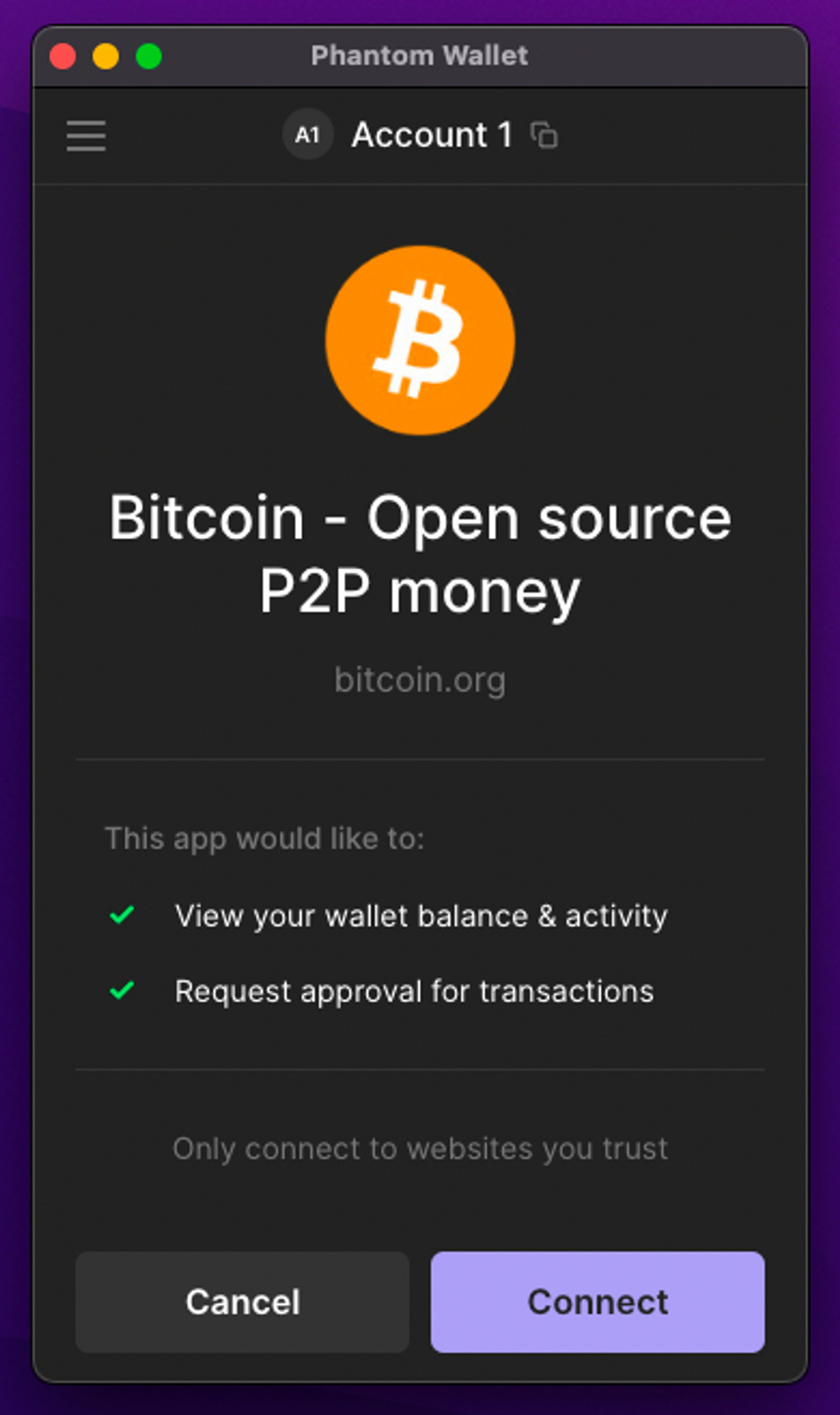 The `requestAccounts` method returns a [Promise](https://developer.mozilla.org/en-US/docs/Web/JavaScript/Reference/Global_Objects/Promise) that resolves if the user approves the connection request. Once resolved, it contains an array of the user's `BtcAccount` objects. If the user declines the request or closes the pop-up, it will reject (throw when awaited).
The array of `BtcAccount` objects represent the possible addresses that can be used when a user connects with Phantom. This is defined as:
```typescript theme={null}
type BtcAccount = {
address: string;
addressType: "p2tr" | "p2wpkh" | "p2sh" | "p2pkh";
publicKey: string;
purpose: "payment" | "ordinals";
};
```
Where:
* `address`: The Bitcoin address owned by the user.
* `addressType`: The address's format. For details, see [Bitcoin Design Glossary](https://bitcoin.design/guide/glossary/address/).
* `publicKey`: A hex string representing the bytes of the public key of the account.
* `purpose`: The general purpose of the address. If `ordinals`, the user prefers to store Ordinals on this address. If `payment`, the user prefers to store bitcoin on this address.
The purpose fields represent user preferences and do not represent a guarantee that there will only be Bitcoin on `payment` addresses or only Ordinals on `ordinals` addresses. When submitting a transaction, make sure to carefully select UTXOs such that you do not cause the user to accidentally spend a rare or inscribed satoshi.
The following is an example of how to connect to Phantom:
```typescript theme={null}
const phantomProvider = getProvider(); // see "Detecting the Provider"
const accounts = await phantomProvider.requestAccounts();
console.log(accounts);
/**
[
{
"address": "bc1phajtersv55fwud5xr0t70p5234swy396a6avqhuny0qf83zssvrsm7tl4q",
"publicKey": "02435c68c1f20522946e46bcc39f8a19088095939db840e874e1ad2c18f0f2361c"
"addressType": "p2tr"
"purpose": "ordinals"
},
{
"address": "bc1qqy4emmf7q623vlf2z4j3pvgfyjkaffx2u3fkpk",
"publicKey": "0279f5b4123030accae6c4ca9a17263753a21df2142bbf0ced940d28ca613e87f9"
"addressType": "p2wpkh"
"purpose": "payment"
}
]
**/
```
## Disconnect
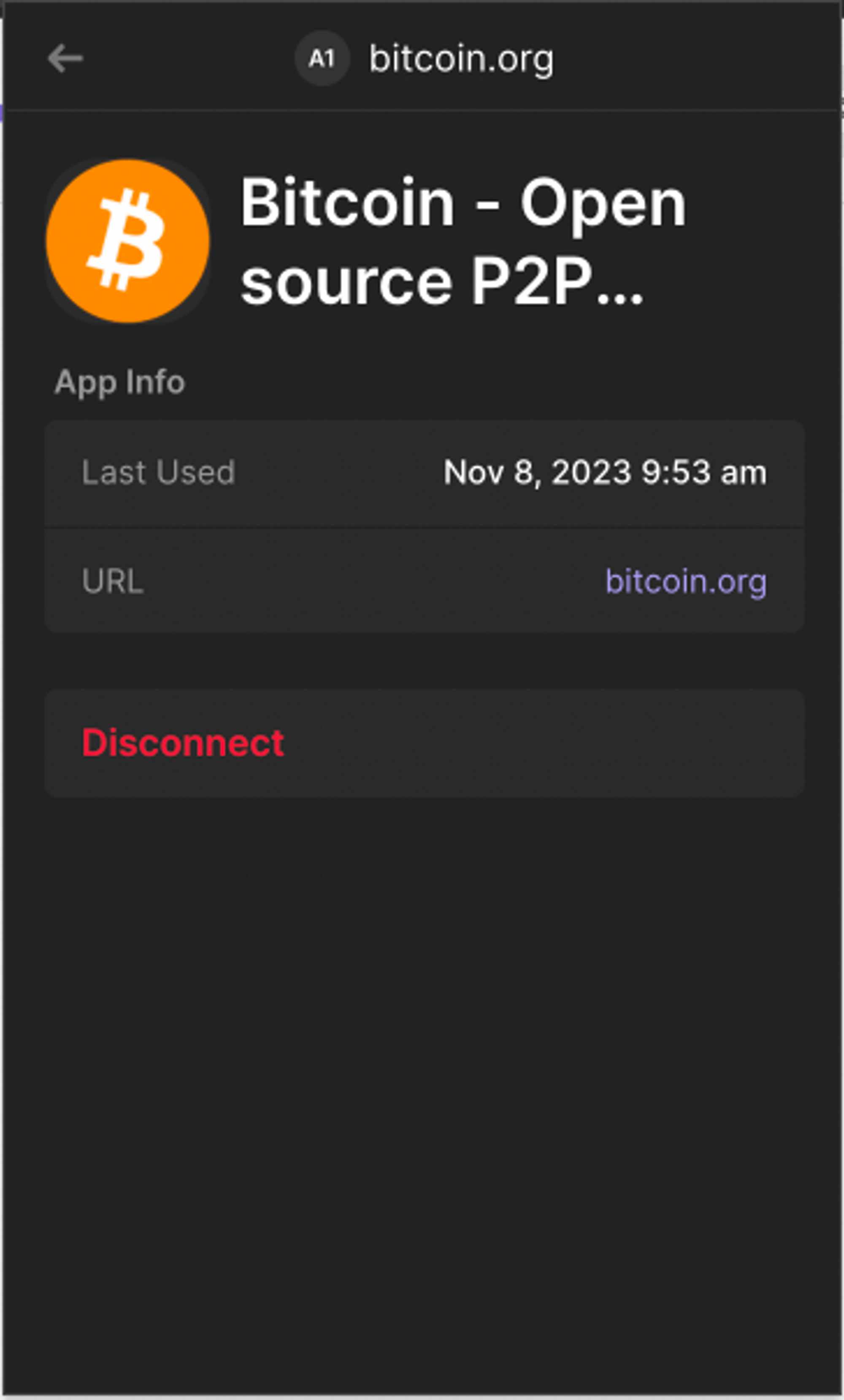
There is no way for dapps to programmatically disconnect a user. Once a user has established a connection, Phantom will add the website they opened a connection with to a list of **Connected Apps**. When a user returns to one of these whitelisted sites, Phantom will attempt to reconnect the application automatically. At any time, the user can revoke access to the dapp through their UI by navigating to **Settings** > **Connected Apps**. If a user disconnects from a dapp, they will need to reconnect on the subsequent visit before signing a message or sending a transaction.
The `requestAccounts` method returns a [Promise](https://developer.mozilla.org/en-US/docs/Web/JavaScript/Reference/Global_Objects/Promise) that resolves if the user approves the connection request. Once resolved, it contains an array of the user's `BtcAccount` objects. If the user declines the request or closes the pop-up, it will reject (throw when awaited).
The array of `BtcAccount` objects represent the possible addresses that can be used when a user connects with Phantom. This is defined as:
```typescript theme={null}
type BtcAccount = {
address: string;
addressType: "p2tr" | "p2wpkh" | "p2sh" | "p2pkh";
publicKey: string;
purpose: "payment" | "ordinals";
};
```
Where:
* `address`: The Bitcoin address owned by the user.
* `addressType`: The address's format. For details, see [Bitcoin Design Glossary](https://bitcoin.design/guide/glossary/address/).
* `publicKey`: A hex string representing the bytes of the public key of the account.
* `purpose`: The general purpose of the address. If `ordinals`, the user prefers to store Ordinals on this address. If `payment`, the user prefers to store bitcoin on this address.
The purpose fields represent user preferences and do not represent a guarantee that there will only be Bitcoin on `payment` addresses or only Ordinals on `ordinals` addresses. When submitting a transaction, make sure to carefully select UTXOs such that you do not cause the user to accidentally spend a rare or inscribed satoshi.
The following is an example of how to connect to Phantom:
```typescript theme={null}
const phantomProvider = getProvider(); // see "Detecting the Provider"
const accounts = await phantomProvider.requestAccounts();
console.log(accounts);
/**
[
{
"address": "bc1phajtersv55fwud5xr0t70p5234swy396a6avqhuny0qf83zssvrsm7tl4q",
"publicKey": "02435c68c1f20522946e46bcc39f8a19088095939db840e874e1ad2c18f0f2361c"
"addressType": "p2tr"
"purpose": "ordinals"
},
{
"address": "bc1qqy4emmf7q623vlf2z4j3pvgfyjkaffx2u3fkpk",
"publicKey": "0279f5b4123030accae6c4ca9a17263753a21df2142bbf0ced940d28ca613e87f9"
"addressType": "p2wpkh"
"purpose": "payment"
}
]
**/
```
## Disconnect
There is no way for dapps to programmatically disconnect a user. Once a user has established a connection, Phantom will add the website they opened a connection with to a list of **Connected Apps**. When a user returns to one of these whitelisted sites, Phantom will attempt to reconnect the application automatically. At any time, the user can revoke access to the dapp through their UI by navigating to **Settings** > **Connected Apps**. If a user disconnects from a dapp, they will need to reconnect on the subsequent visit before signing a message or sending a transaction.
 ## Change accounts
Phantom allows users to manage multiple accounts from within a single extension or mobile app. Whenever a user switches accounts, Phantom will emit an `accountsChanged` event.
```typescript theme={null}
phantomProvider.on('accountsChanged', (accounts: BtcAccount[]) => {
console.log('Accounts changed:', accounts);
});
```
If Phantom passes an empty array on `accountsChanged`, it implies that the user has switched to an account that has not connected to the dapp before (that is, not already in **Connected Apps**) or does not support Bitcoin (for example, a Solana private key account). In this case, the application can either do nothing or attempt to reconnect:
```typescript theme={null}
phantomProvider.on('accountsChanged', (accounts: BtcAccount[]) => {
if (accounts.length > 0) {
// Set new address and continue as usual
} else {
// Attempt to reconnect to Phantom
phantomProvider.requestAccounts().catch((error) => {
// handle connection failure
});
}
});
```
## Change accounts
Phantom allows users to manage multiple accounts from within a single extension or mobile app. Whenever a user switches accounts, Phantom will emit an `accountsChanged` event.
```typescript theme={null}
phantomProvider.on('accountsChanged', (accounts: BtcAccount[]) => {
console.log('Accounts changed:', accounts);
});
```
If Phantom passes an empty array on `accountsChanged`, it implies that the user has switched to an account that has not connected to the dapp before (that is, not already in **Connected Apps**) or does not support Bitcoin (for example, a Solana private key account). In this case, the application can either do nothing or attempt to reconnect:
```typescript theme={null}
phantomProvider.on('accountsChanged', (accounts: BtcAccount[]) => {
if (accounts.length > 0) {
// Set new address and continue as usual
} else {
// Attempt to reconnect to Phantom
phantomProvider.requestAccounts().catch((error) => {
// handle connection failure
});
}
});
```