> ## Documentation Index
> Fetch the complete documentation index at: https://docs.phantom.com/llms.txt
> Use this file to discover all available pages before exploring further.
# Domain and transaction warnings
> Understand the domain and transaction warnings Phantom displays to protect users and how to resolve them.
Phantom may display different warnings when users connect to your app or sign transactions.
These warnings are designed to help protect users from unexpected or unsafe activity.
## New domain warning
If your app or website has been newly launched, Phantom may show users the following message:
> *“This domain is new or has not been reviewed yet. Proceed with caution.”*
 This warning appears automatically for newly detected domains and typically disappears after a few days once the domain has been reviewed.
There’s usually **no action required** on your part. If the warning remains visible for more than a week, contact our domain review team using this [form](https://docs.google.com/forms/d/1JgIxdmolgh_80xMfQKBKx9-QPC7LRdN6LHpFFW8BlKM/viewform).
## Transaction simulation warning
If Phantom can’t accurately simulate a transaction before it’s sent, users may see the following message:
> *“This dApp could be malicious. Do not proceed unless you are certain it is safe.”*
This warning appears automatically for newly detected domains and typically disappears after a few days once the domain has been reviewed.
There’s usually **no action required** on your part. If the warning remains visible for more than a week, contact our domain review team using this [form](https://docs.google.com/forms/d/1JgIxdmolgh_80xMfQKBKx9-QPC7LRdN6LHpFFW8BlKM/viewform).
## Transaction simulation warning
If Phantom can’t accurately simulate a transaction before it’s sent, users may see the following message:
> *“This dApp could be malicious. Do not proceed unless you are certain it is safe.”*
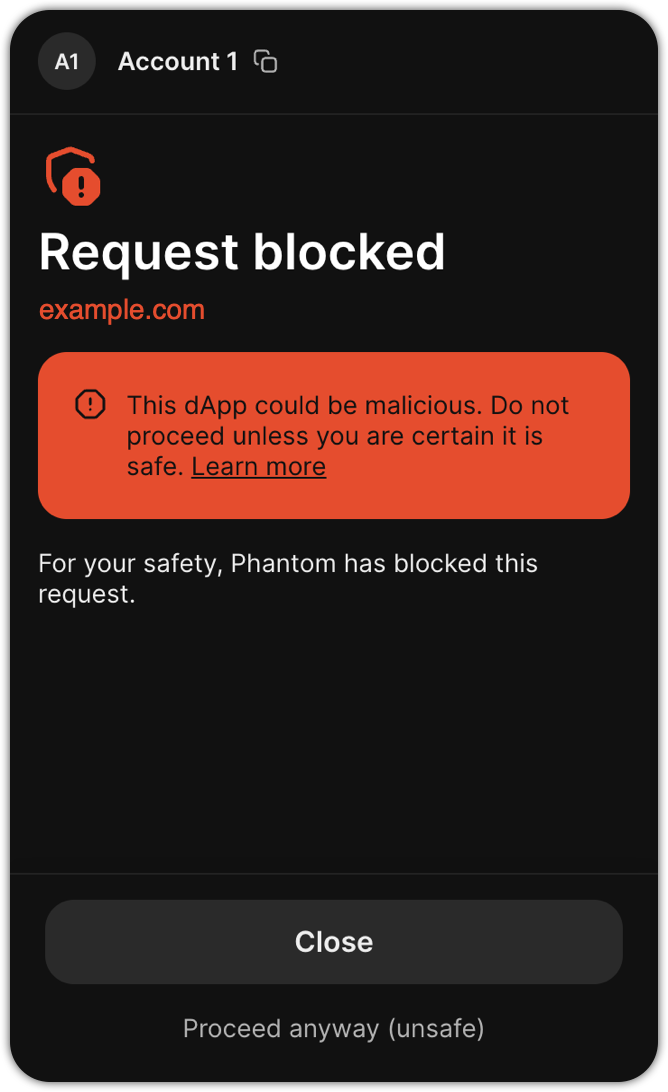 This message appears when Phantom is unable to safely predict a transaction’s outcome before execution.
If Phantom displays this warning when you sign a transaction on your domain, follow these steps:
* Limit the transaction to **one** signer.
* If the transaction requires multiple signers, sign it with Phantom first using [signTransaction](https://docs.phantom.com/solana/sending-a-transaction#sign-a-transaction-without-sending) instead of signAndSendTransaction, then collect signatures from the other signers.
* If your transaction approaches Solana’s size limit, split it into multiple signing requests or use [Address Lookup Tables](https://docs.phantom.com/solana/sending-a-transaction-1#build-an-address-lut).
* Before submitting the transaction for signing, simulate the transaction with `sigVerify: false` using your RPC node to ensure they will not fail onchain. Failed transactions could trigger simulation warnings.
If you've made these changes and the warning persists, or if you can't apply these changes, contact our domain review team using this [form](https://docs.google.com/forms/d/1JgIxdmolgh_80xMfQKBKx9-QPC7LRdN6LHpFFW8BlKM/viewform).
## Prediction market token burn warning
If a transaction attempts to burn a prediction market token, Phantom may show users the following message:
> *"This transaction will burn a valuable prediction market token. Please use the Phantom app to close the position first."*
This warning appears when Phantom detects a transaction that would permanently burn a prediction market token.
To resolve this warning, contact our Trust and Safety team using this [form](https://docs.google.com/forms/d/1JgIxdmolgh_80xMfQKBKx9-QPC7LRdN6LHpFFW8BlKM/viewform).
This message appears when Phantom is unable to safely predict a transaction’s outcome before execution.
If Phantom displays this warning when you sign a transaction on your domain, follow these steps:
* Limit the transaction to **one** signer.
* If the transaction requires multiple signers, sign it with Phantom first using [signTransaction](https://docs.phantom.com/solana/sending-a-transaction#sign-a-transaction-without-sending) instead of signAndSendTransaction, then collect signatures from the other signers.
* If your transaction approaches Solana’s size limit, split it into multiple signing requests or use [Address Lookup Tables](https://docs.phantom.com/solana/sending-a-transaction-1#build-an-address-lut).
* Before submitting the transaction for signing, simulate the transaction with `sigVerify: false` using your RPC node to ensure they will not fail onchain. Failed transactions could trigger simulation warnings.
If you've made these changes and the warning persists, or if you can't apply these changes, contact our domain review team using this [form](https://docs.google.com/forms/d/1JgIxdmolgh_80xMfQKBKx9-QPC7LRdN6LHpFFW8BlKM/viewform).
## Prediction market token burn warning
If a transaction attempts to burn a prediction market token, Phantom may show users the following message:
> *"This transaction will burn a valuable prediction market token. Please use the Phantom app to close the position first."*
This warning appears when Phantom detects a transaction that would permanently burn a prediction market token.
To resolve this warning, contact our Trust and Safety team using this [form](https://docs.google.com/forms/d/1JgIxdmolgh_80xMfQKBKx9-QPC7LRdN6LHpFFW8BlKM/viewform).