The Phantom Connect React SDK provides React hooks for connecting to existing Phantom user wallets in your React apps with native transaction support across multiple blockchains.

Features

  • Built for React: Provides React hooks (usePhantom, useModal) and a provider component for app-level configuration.
  • Multi-chain support: Solana (available now), other chains coming soon.
  • Connection modal: Built-in, customizable modal for connecting users to Phantom.
  • Flexible authentication providers: OAuth (Google, Apple), Phantom extension, embedded wallets, and injected providers.
  • User wallet integration: Connects to existing Phantom user wallets using Phantom Connect.
  • TypeScript support: Fully typed API surface.

Security

The Phantom Connect React SDK connects to existing Phantom user wallets, ensuring:
  • Users control their own wallets and private keys.
  • Integration with Phantom’s secure wallet infrastructure.
  • No private key handling in your application.
  • User maintains full control of their assets.

Prerequisites

  • Register your app: Sign up or log in to the Phantom Portal and register your app.
  • Obtain your App ID:
    • In Phantom Portal, go to your app and open URL Config (left-hand menu). This page shows your allowed origins and redirect URLs.
    • Scroll down to the App ID section at the bottom of the page — your App ID is listed there, below the URL configurations.
    • Copy the App ID for use in your integration.
  • Allowlist your domains and redirect URLs: Add your app’s domains and redirect URLs in the Phantom Portal to enable wallet connections.

Authentication configuration

When using OAuth providers (google, apple), you’ll need to configure authentication options:
authOptions: {
  redirectUrl: "https://yourapp.com/auth/callback", // Your callback page
}
Important notes about redirectUrl:
  • Must be an existing page/route in your application
  • Must be whitelisted in your Phantom Portal app configuration
  • This is where users will be redirected after completing OAuth authentication
  • Required for google and apple providers
  • Not required for phantom provider (uses extension for auth) or injected provider

Installation

npm install @phantom/react-sdk@beta

Dependencies

Install additional dependencies based on the networks you want to support:
Network supportRequired dependencies
Solana@solana/web3.js OR @solana/kit
Ethereum/EVMviem
Example for Solana and Ethereum support:
npm install @phantom/react-sdk@beta @solana/web3.js viem

Quick start

import { PhantomProvider, useModal, darkTheme, usePhantom } from "@phantom/react-sdk";
import { AddressType } from "@phantom/browser-sdk";

function App() {
  return (
    <PhantomProvider
      config={{
        providers: ["google", "apple", "injected"], // Enabled auth methods
        appId: "your-app-id", // Get your app ID from phantom.com/portal
        addressTypes: [AddressType.solana, AddressType.ethereum],
        authOptions: {
          redirectUrl: "https://yourapp.com/auth/callback", // Must be whitelisted in Phantom Portal
        },
      }}
      theme={darkTheme}
      appIcon="https://your-app.com/icon.png"
      appName="Your App Name"
    >
      <WalletComponent />
    </PhantomProvider>
  );
}

function WalletComponent() {
  const { open, close, isOpened } = useModal();
  const { isConnected, user } = usePhantom();

  if (isConnected) {
    return (
      <div>
        <p>Connected</p>
      </div>
    );
  }

  return <button onClick={open}>Connect Wallet</button>;
}

Connection Modal

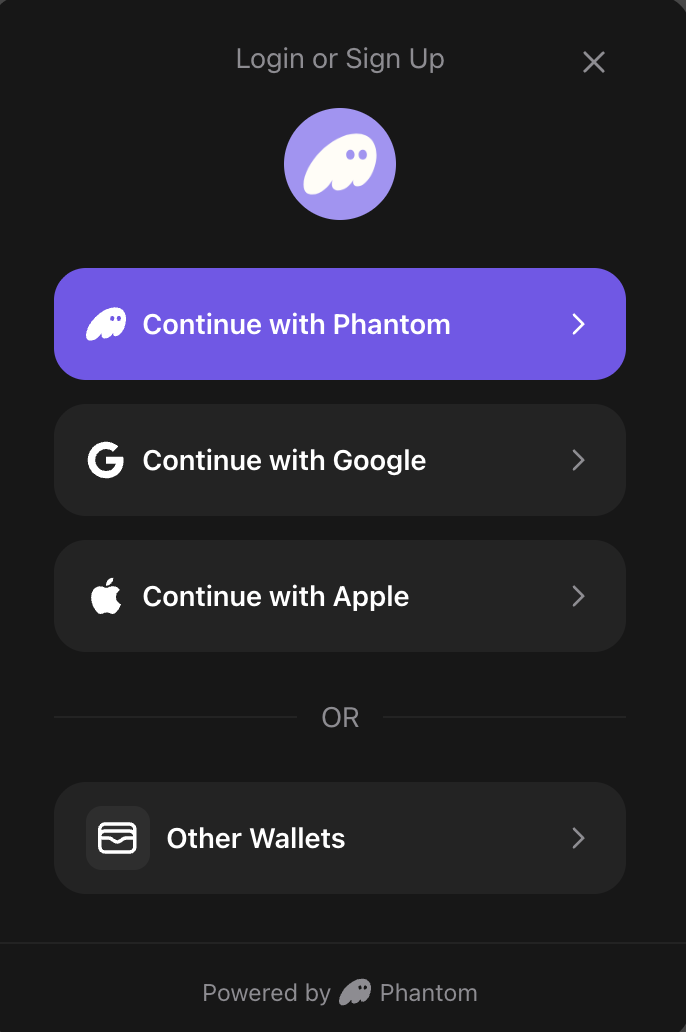
The SDK includes a built-in connection modal UI that provides a user-friendly interface for connecting to Phantom. The modal supports multiple connection methods (Google, Apple, Phantom Login, browser extension) and handles all connection logic automatically.

Using the Modal with useModal Hook

To use the modal, pass a theme prop to PhantomProvider and use the useModal() hook to control visibility:
import { PhantomProvider, useModal, darkTheme, usePhantom } from "@phantom/react-sdk";
import { AddressType } from "@phantom/browser-sdk";

function App() {
  return (
    <PhantomProvider
      config={{
        providers: ["google", "apple", "injected"],
        appId: "your-app-id",
        addressTypes: [AddressType.solana, AddressType.ethereum],
      }}
      theme={darkTheme} // or lightTheme, or custom theme object
      appIcon="https://your-app.com/icon.png"
      appName="Your App Name"
    >
      <WalletComponent />
    </PhantomProvider>
  );
}

function WalletComponent() {
  const { open, close, isOpened } = useModal();
  const { isConnected, user } = usePhantom();

  if (isConnected) {
    return (
      <div>
        <p>Connected as {user?.email || "Unknown"}</p>
      </div>
    );
  }

  return <button onClick={open}>Connect Wallet</button>;
}
Modal Features:
  • Multiple Auth Providers: Google, Apple, Phantom Login, browser extension
  • Automatic Provider Detection: Shows browser extension option when Phantom is installed
  • Mobile Support: Displays deeplink option for Phantom mobile app on mobile devices
  • Error Handling: Clear error messages displayed in the modal
  • Loading States: Visual feedback during connection attempts
  • Responsive Design: Optimized for both mobile and desktop

ConnectButton Component

A ready-to-use button component that handles the complete connection flow:
import { ConnectButton, AddressType } from "@phantom/react-sdk";

function Header() {
  return (
    <div>
      {/* Default: Shows first available address */}
      <ConnectButton />

      {/* Show specific address type */}
      <ConnectButton addressType={AddressType.solana} />
      <ConnectButton addressType={AddressType.ethereum} />

      {/* Full width button */}
      <ConnectButton fullWidth />
    </div>
  );
}
ConnectButton Features:
  • When disconnected: Opens connection modal with auth provider options
  • When connected: Displays truncated address and opens wallet management modal
  • Uses theme styling for consistent appearance

Theming

The SDK includes pre-built themes and supports full customization to match your app’s design.

Pre-built themes

Use the included darkTheme or lightTheme:
import { PhantomProvider, darkTheme, lightTheme } from "@phantom/react-sdk";

// Dark theme
<PhantomProvider config={config} theme={darkTheme} appIcon="..." appName="...">
  <App />
</PhantomProvider>

// Light theme
<PhantomProvider config={config} theme={lightTheme} appIcon="..." appName="...">
  <App />
</PhantomProvider>

Custom themes

Create a custom theme object to fully control the modal’s appearance:
const customTheme = {
  background: "#1a1a1a",         // Background color for modal
  text: "#ffffff",               // Primary text color
  secondary: "#98979C",          // Secondary color for text, borders, dividers
  brand: "#ab9ff2",              // Brand/primary action color
  error: "#ff4444",              // Error state color
  success: "#00ff00",            // Success state color
  borderRadius: "16px",          // Border radius for buttons and modal
  overlay: "rgba(0, 0, 0, 0.8)", // Overlay background color (with opacity)
};

<PhantomProvider config={config} theme={customTheme} appIcon="..." appName="...">
  <App />
</PhantomProvider>
PropertyDescriptionExample
backgroundModal background color"#1a1a1a"
textPrimary text color"#ffffff"
secondarySecondary text, borders, and dividers"#98979C"
brandBrand/primary action color"#ab9ff2"
errorError state color"#ff4444"
successSuccess state color"#00ff00"
borderRadiusBorder radius for buttons and modal"16px"
overlayModal overlay background (supports opacity)"rgba(0, 0, 0, 0.8)"
The secondary color must be a hex color value (e.g., #98979C) as it’s used to derive auxiliary colors with opacity.

Chain-Specific Hooks

The React SDK provides dedicated hooks for each blockchain:

useSolana hook

import { useSolana } from "@phantom/react-sdk";

function SolanaOperations() {
  const { solana } = useSolana();

  const signMessage = async () => {
    const signature = await solana.signMessage("Hello Solana!");
    console.log("Signature:", signature);
  };

  const signAndSendTransaction = async () => {
    const result = await solana.signAndSendTransaction(transaction);
    console.log("Transaction sent:", result.hash);
  };

  const switchNetwork = async () => {
    await solana.switchNetwork('devnet');
  };

  return (
    <div>
      <button onClick={signMessage}>Sign Message</button>
      <button onClick={signAndSendTransaction}>Send Transaction</button>
      <button onClick={switchNetwork}>Switch to Devnet</button>
      <p>Connected: {solana.isConnected ? 'Yes' : 'No'}</p>
    </div>
  );
}

useEthereum hook

import { useEthereum } from "@phantom/react-sdk";

function EthereumOperations() {
  const { ethereum } = useEthereum();

  const signPersonalMessage = async () => {
    const accounts = await ethereum.getAccounts();
    const signature = await ethereum.signPersonalMessage("Hello Ethereum!", accounts[0]);
    console.log("Signature:", signature);
  };

  const sendTransaction = async () => {
    const result = await ethereum.sendTransaction({
      to: "0x742d35Cc6634C0532925a3b8D4C8db86fB5C4A7E",
      value: "1000000000000000000", // 1 ETH in wei
      gas: "21000",
    });
    console.log("Transaction sent:", result.hash);
  };

  const switchChain = async () => {
    await ethereum.switchChain(137); // Switch to Polygon
  };

  return (
    <div>
      <button onClick={signPersonalMessage}>Sign Personal Message</button>
      <button onClick={sendTransaction}>Send Transaction</button>
      <button onClick={switchChain}>Switch to Polygon</button>
      <p>Connected: {ethereum.isConnected ? 'Yes' : 'No'}</p>
    </div>
  );
}
Supported EVM Networks:
NetworkChain IDUsage
Ethereum Mainnet1ethereum.switchChain(1)
Ethereum Sepolia11155111ethereum.switchChain(11155111)
Polygon Mainnet137ethereum.switchChain(137)
Polygon Amoy80002ethereum.switchChain(80002)
Base Mainnet8453ethereum.switchChain(8453)
Base Sepolia84532ethereum.switchChain(84532)
Arbitrum One42161ethereum.switchChain(42161)
Arbitrum Sepolia421614ethereum.switchChain(421614)
Monad Mainnet143ethereum.switchChain(143)
Monad Testnet10143ethereum.switchChain(10143)

Auto-Confirm Hook (Injected Provider Only)

The SDK provides auto-confirm functionality that allows automatic transaction confirmation for specified chains.

useAutoConfirm hook

import { useAutoConfirm, NetworkId } from "@phantom/react-sdk";

function AutoConfirmControls() {
  const {
    enable,
    disable, 
    status,
    supportedChains,
    isLoading,
    error,
  } = useAutoConfirm();

  const handleEnable = async () => {
    // Enable auto-confirm for specific chains
    const result = await enable({
      chains: [NetworkId.SOLANA_DEVNET, NetworkId.ETHEREUM_MAINNET]
    });
    console.log("Auto-confirm enabled:", result);
  };

  const handleDisable = async () => {
    await disable();
    console.log("Auto-confirm disabled");
  };

  return (
    <div>
      <p>Status: {status?.enabled ? "Enabled" : "Disabled"}</p>
      <button onClick={handleEnable} disabled={isLoading}>
        Enable Auto-Confirm
      </button>
      <button onClick={handleDisable} disabled={isLoading}>
        Disable Auto-Confirm
      </button>
    </div>
  );
}

Available hooks

HookPurposeReturns
useModalControl the connection modal{ open, close, isOpened }
usePhantomAccess wallet/user state{ isConnected, user, wallet }
useConnectConnect to wallet{ connect, isConnecting, error }
useModalControl connection modal{ open, close, isOpened }
useAccountsGet wallet addressesWalletAddress[] or null
useIsExtensionInstalledCheck extension status{ isLoading, isInstalled }
useDisconnectDisconnect from wallet{ disconnect, isDisconnecting }
useAutoConfirmAuto-confirm management (injected only){ enable, disable, status, supportedChains, ... }
useSolanaSolana chain operations{ solana: { signMessage, signAndSendTransaction, ... } }
useEthereumEthereum chain operations{ ethereum: { signPersonalMessage, sendTransaction, ... } }

What you can do

Starter kits and examples

Get started quickly with production-ready React templates:

Additional resources